
• Home
  • About
  • Contact Us

gametipcenter.com - tips and guides for your favorite games.

Login

Login
GameTipCenterGameTipCenter
Cheats and guides for your
favorite video games
  • Home
  • Links
  • Contact
  • About
  • Privacy Policy

Diablo 3: How to Customize Your Banner

May 20, 2012 Posted by DoubleDizle PC

In Diablo 3 for the PC, you can customize your banner to your liking in a lot of different ways, from colors, to patterns, and icons, etc.

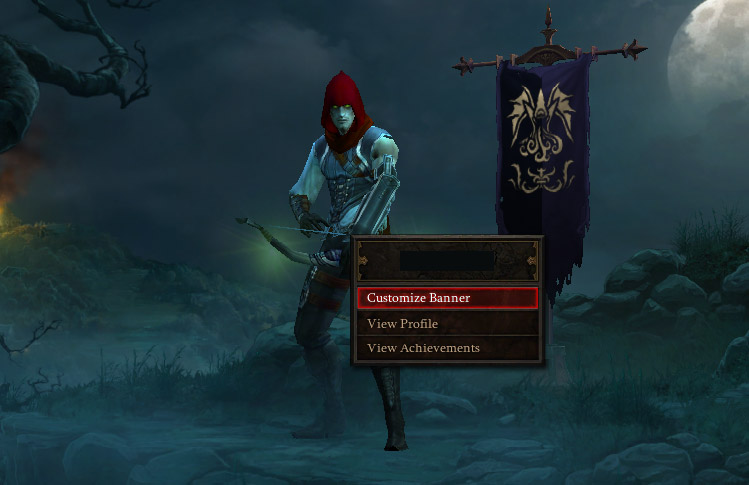
To customize your banner, you just need to right click on your character on the characters screen.

This will bring up a menu, so just select Customize Banner from here.
Tags: Diablo 3
Share
0

About DoubleDizle

Gamer, Software Engineer, Web Developer, Professional Geek

You also might be interested in

Diablo 3: How to Unlock Difficulties

May 24, 2012

In Diablo 3 for the PC, you can’t just jump[...]

Diablo 3: How to Check FPS (Frames Per Second)

May 31, 2012

In Diablo 3 for the PC, if you’re worried about[...]

Diablo 3: How to Save

May 23, 2012

I’ve seen several people asking in forums how to save[...]

Contact Us

We're currently offline. Send us an email and we'll get back to you, asap.

Send Message

© 2026 · Your Website. Theme by HB-Themes.

  • Privacy Policy
  • About
Prev Next