• Home
  • About
  • Contact Us

gametipcenter.com - tips and guides for your favorite games.

Login

Login
GameTipCenterGameTipCenter
Cheats and guides for your
favorite video games
  • Home
  • Links
  • Contact
  • About
  • Privacy Policy

Xbox 360: How to Delete a Profile

September 27, 2012 Posted by DoubleDizle XBox 360

If you have profiles on your Xbox 360 that you no longer need, you can delete them fairly easily. Note that any saved games will be lost from those profiles however.

Navigate to the Settings tab and select Storage.
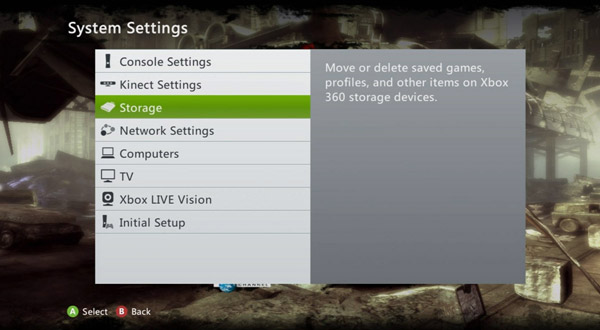
How to delete a profile on the Xbox 360

Select your Hard Drive, or whatever location your profiles are currently stored in.
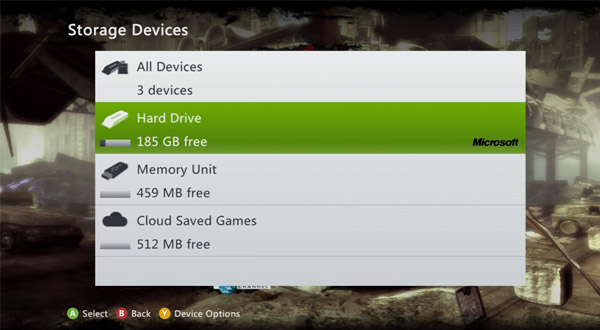
How to delete a profile on the Xbox 360

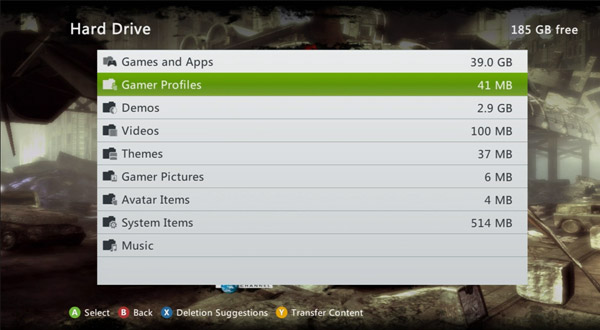
Select Gamer Profiles.

How to delete a profile on the Xbox 360

Select the profile, and select Delete on the next screen.
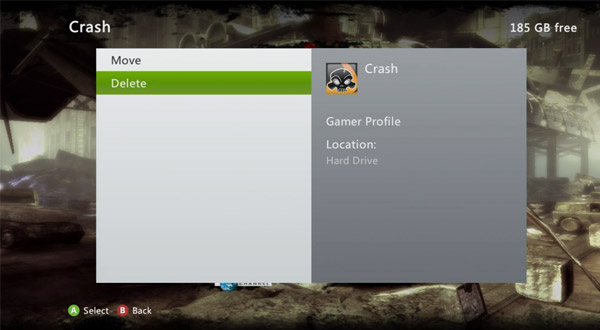
How to delete a profile on the Xbox 360

Tags: xbox 360 how to
Share
0

About DoubleDizle

Gamer, Software Engineer, Web Developer, Professional Geek

You also might be interested in

Xbox 360: How to Delete System Cache

Sep 27, 2012

On the Xbox 360, if you’re having issues with your[...]

Xbox 360: How to Connect to System Link

Sep 28, 2012

On the Xbox 360, you can play games on multiple[...]

Xbox 360: How to Change Your Theme

Sep 27, 2012

On the Xbox 360, there are a lot of different[...]

Contact Us

We're currently offline. Send us an email and we'll get back to you, asap.

Send Message

© 2026 · Your Website. Theme by HB-Themes.

  • Privacy Policy
  • About
Prev Next