
In SimCity (the 2013 version, aka SimCity 5) on the PC, unlike in SimCity 4, there are no longer set zone densities. The density that a building becomes is now dependent on other factors.
The primary factor is road density. If you want a high density zone, the street it is connected to has to be high density as well. Like in the real world, you won’t likely have a sky scraper on a residential road, right?
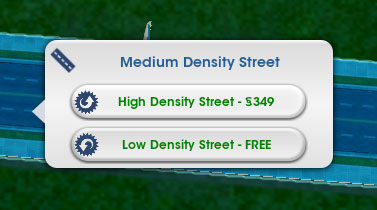
You can tear down roads and rebuild them as higher density if you’d like, but if you already have a road network in place, you can just upgrade your current roads
To upgrade a road, click on the roads menu and look for the Road Upgrade button at the bottom.
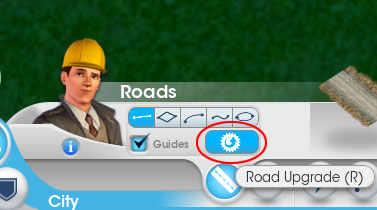
Click the Road Upgrade button, and click on one of your roads to get the upgrade menu. The upgrade has a cost of course, based on the length of your road.
You can’t just create high density roads though and expect high density buildings, you have to keep your wealthier residents and business owners happy.
Click the little smiley button at the bottom of your screen, and you’ll bring up the Approval Rating screen.
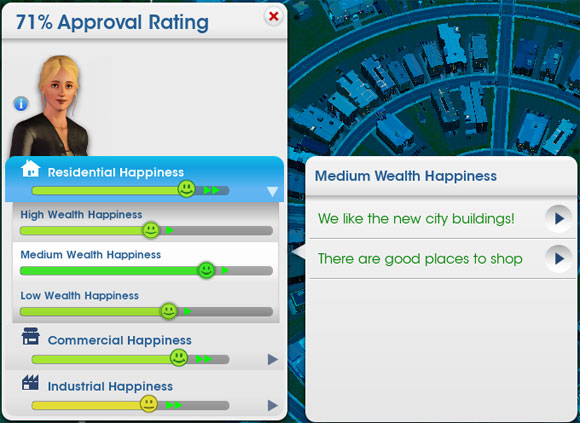
This is an important screen to keep an eye on. The sims in your city will tell what they enjoy, and what they hate. If you can keep them happy, then they are more likely to to upgrade their buildings eventually.
Obviously each zone type has different wants and needs. Residents wants low taxes, high paying jobs, clean air, and education. Commerce wants happy, high paying customers, and freight to sell from industry. Industry wants good, educated workers.
The final requirement in order for a building to increase in density is that there is ample room for your it to do so. The largest residential and commercial buildings for example are the width and depth equivalent to the length of a Tall Tree Row park, which is in the medium wealth category. I use these regularly when I’m laying out my roads so that I know I have enough space.
I like to setup my road network in blocks that are the size of four of these large buildings in a square. Setting your roads to the guides will give you ample room, but you’ll notice that it gives extra wasted space between them the width of a single road. It doesn’t sound like much, but multiply this across the entire map (which isn’t that large) and that’s a lot of wasted space that you could be using for more buildings.
